Summary
Thank you for taking your time to review my submission. Please find the project requirements and a description of my solutions below.
Tech Stack
- Next.js 13 with App directory
- TypeScript
- React Context for state management
- React Leaflet for generating map chart
- React Chart.js 2 for generating line chart
- Tailwind for styling
- Jest/React Testing Library for testing
- Eslint





Problem 1: Implement a Map with Location Markers and Risk Indicators
Set up a Next.js boilerplate app using the provided command.
The provided command was run and latest Next.js, TypeScript, Tailwind were installed. Only modification made was to remove the src directory flag.
Load and parse the sample datasets.
When the Nextjs server is started, the entire 5000 row dataset is loaded into server-side memory. Data for the map component is provided by the risks/map API endpoint. This endpoint performs data transformation server-side to group data by lat, long (see section on performance for more details on API structure). The response object is a json object where keys are the distinct lat,longs in the dataset so that O(1) lookups can be done for a given lat,long if necessary.
Integrate a mapping library (e.g., Mapbox, Leaflet, Google Maps).
Leaflet was selected for the mapping library.
Implement a control for users to select different decades
Implemented and integrated into the filter controls along the top of the UI.
Display the locations (Lat, Long) from the dataset as markers on the map of a given decade year.
Markers were implemented using svg images.
Color-code the markers based on their Risk Rating (climate risk score) derived from the dataset.
Map markers were colour coded based on brand colours and categorized by low(> .5), medium (.5-.7), high risk (> .7).
Add interactivity to the map, such as zooming and panning, and display a tooltip with the Asset Name and Business Category on marker hover.
Implemented using the leaflet library. The map was also considered a filtering tool so when a marker is clicked a filter for the selected lat, long is applied to the dataset. Additionally, when a marker is selected, all other markers are hidden and a message is shown to make clear to the user that a filter is in effect.
Problem 2: Create a Data Table with Sorting and Filtering Capabilities
Create a data table component.
Datatable component was created ’from scratch’ without the use of a library.
Load and display the sample dataset with a given year selection (from Problem 1) in the table.
Implemented similar to map component, dedicated API created (risks/table) which returns paginated results used by the table. Component also linked to any global filters applied.
Implement sorting functionality on reasonable columns.
Sorting applied to Asset Name, Lat, Long, Business Category, Risk Rating, and Year.
Implement filter functionality on reasonable columns, especially risk factors.
Individual risk factor checkboxes were provided in the filter controls section at the top of the page. Additionally, all other filters (Year, Assets, Business Categories) are also applied to datatable.
Problem 3: Visualize Risk Over Time with Line Graphs
Set up a charting library (e.g., Chart.js, D3.js, Highcharts).
React Chart.js2 was selected and implemented.
Implement a line graph component that displays the Risk Rating over time (Year) for a selected location (Lat, Long), Asset, or Business Category.
A specific API endpoint was created to aggregate the data by year and calculate average risk rating for an entire year. Additionally, average risk rating (within a year)for each specific risk factor was calculated.
Add interactivity to the graph, such as tooltips displaying Asset Name, Risk Rating, Risk Factors, and Year.
Tool tips were constructed to show average risk rating for a given year for applied filters. Additionally, the average risk rating is displayed for each risk factor for a given year.
Implement controls for selecting different locations, Assets, or Business Categories to visualize their risk levels over time. You may need to perform some data aggregation in order to achieve this.
Implemented by linking line data with global filters.
Problem 4: Integrate Components and Optimize Performance
Design a user interface that integrates the map, data table, and line graph components.
Design was developed around a single set of filters at the top of the UI. The map component also acts as the lat, long filter for the application. All 3 components (map, line chart, table) share the same set of filters.
Applied Basic Mobile Styling. Future improvements include making filter components hidden via side-drawer.
Tested for accessibility with Google Lighthouse (98%). Also implemented keyboard navigation for accessibility.
Implement state management to handle user interactions and data flow between components (e.g., selecting a location on the map updates the line graph and data table).
Implemented by React Context which stores all filter values (Year, Asset, Business Category, Risk Factors, Location).
Optimize the app’s performance by implementing lazy loading for components and efficient data handling, such as pagination for the data table.
Map component implements lazy loading with ’next/dynamic’. Data table was implemented with pagination so only 10 results at a time are sent client-side.
Additionally, the dataset used for initial page load is pre-generated on server-side so the app can be rendered on first load without making initial API call.
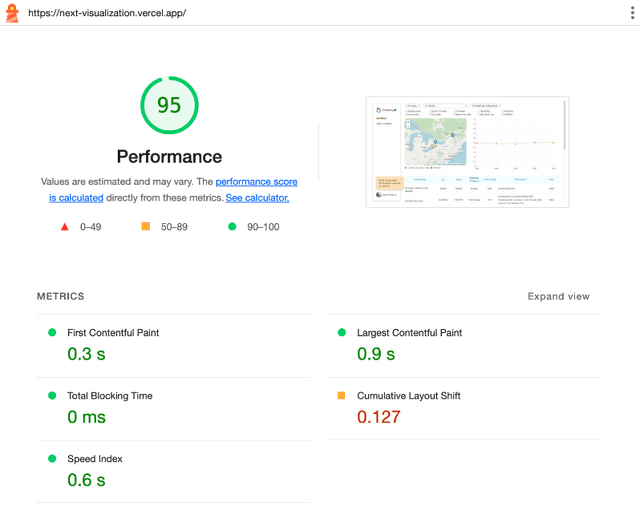
Performance also measured by Google Lighthouse to achieve 95% score:
To ensure performance and scalability both on client and server side, each charts were provided individual API endpoint which sends the transformed/aggregated data for the specific component. Currently, these transformations are performed within NextJs API Routes, but would be replaced with API calls to a backend/database in a production environment.
Where possible, data was transformed to javascript objects. This was for O(1) lookups on keys.
(Bonus) Implement reasonable tests for utility functions, data flow hooks, and React components.
Jest and React Testing Library was used for testing.
References
- Official Documentations for each package/library
- https://www.youtube.com/watch?v=gSSsZReIFRk for Next.js 13 new functionalities
- https://www.youtube.com/watch?v=Y6KDk5iyrYE for more in depth Next.js 13 concepts
- https://www.bekk.christmas/post/2020/13/a-hot-chocolate-map-with-react-leaflet-and-typescript for React leaflet
- ChatGPT for tailwind class names as well as TypeScript syntax.